Key Takeaways
- Time blocking works. The reason it fails for most people isn't the method, it's the format -> a PDF you fill out on Sunday and forget by Wednesday.
- 5 methods are worth knowing: Deep Work, Eisenhower, Pomodoro, Ultradian, Maker/Manager. Each fits a different kind of day.
- The right home for a time block is your real calendar, not a printable. If it doesn't move when your 10am moves, it's already dead.
- We built a free Time Blocking Template Generator -> pick a method, shape your day, export to your calendar in 90 seconds.
I've tried every time blocking template on the internet. PDFs, Notion templates, Google Sheets, fancy printables on Etsy. They all die the same way: I fill them out on Sunday night, follow them Monday, tweak them Tuesday, and by Wednesday they're buried under real meetings.
The failure was never the method. It was the format.
Time blocking, as a technique, has more research behind it than almost any other productivity practice. It's how Cal Newport writes books while teaching full-time. It's how every serious operator I've met protects the hours that actually matter. The logic is unbeatable: decide once, in advance, instead of re-deciding every 25 minutes.
But a static PDF can't do that. It doesn't know your 10am moved to 2pm. It doesn't know your focus block just got eaten by a fire drill. It just sits there, mocking you.
Here's how I think about time blocking now -> what it actually is, the 5 methods worth knowing, the 3-step playbook I run, and the free interactive generator we built that drops your day straight into your real calendar.
No filler. Just the playbook.
What Time Blocking Actually Is
Time blocking is assigning every block of your workday to a specific task, project, or category — in advance, before the day starts.
Instead of working from a to-do list and re-deciding what to do at every context switch, you decide once (the night before, or first thing in the morning), then execute.
The core insight: deciding what to do next is the most expensive cognitive operation in knowledge work.
Every time I finish a task and look up at my screen, I burn 10-15 minutes of context-switching overhead before the next task starts producing real work. Multiply that by the 20-30 micro-decisions in a typical day -> 2 hours of deep work lost to pure friction. Time blocking collapses all of those decisions into one.
It is not the same as scheduling -> a schedule says when meetings happen, a time block says what you do with the rest. It is not the same as a to-do list -> a to-do list is a backlog, a time block is a commitment. And it is definitely not the same as a printable PDF, which is where most people go wrong.
Omnia triages your inbox so you only see what matters
Free forever. No credit card required.
The 5 Methods That Actually Work
There's no canonical "5 methods" list. But these are the 5 systems I've seen real operators use, and the 5 we built into the generator. Pick based on the work you're doing, not the aesthetic of the template.
1. Deep Work (Cal Newport)
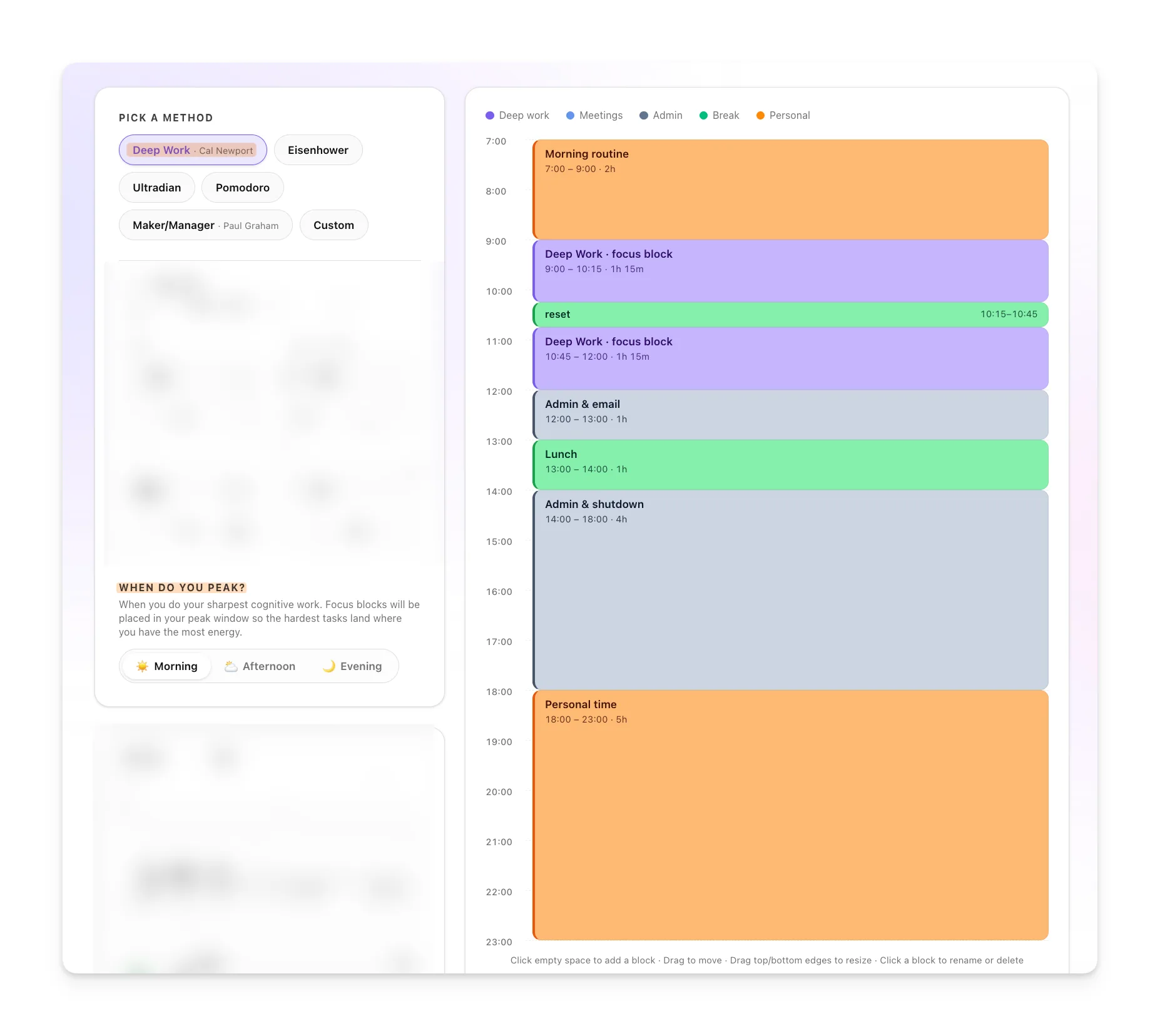
Long uninterrupted focus blocks — 90 minutes to 4 hours — for cognitively demanding work. Meetings and shallow tasks get bundled into the leftover hours. The goal: maximize time in flow state on work that compounds.
Best for: writers, engineers, researchers, designers. Anyone whose output is measured in deep artifacts, not meeting count.
2. The Eisenhower Matrix
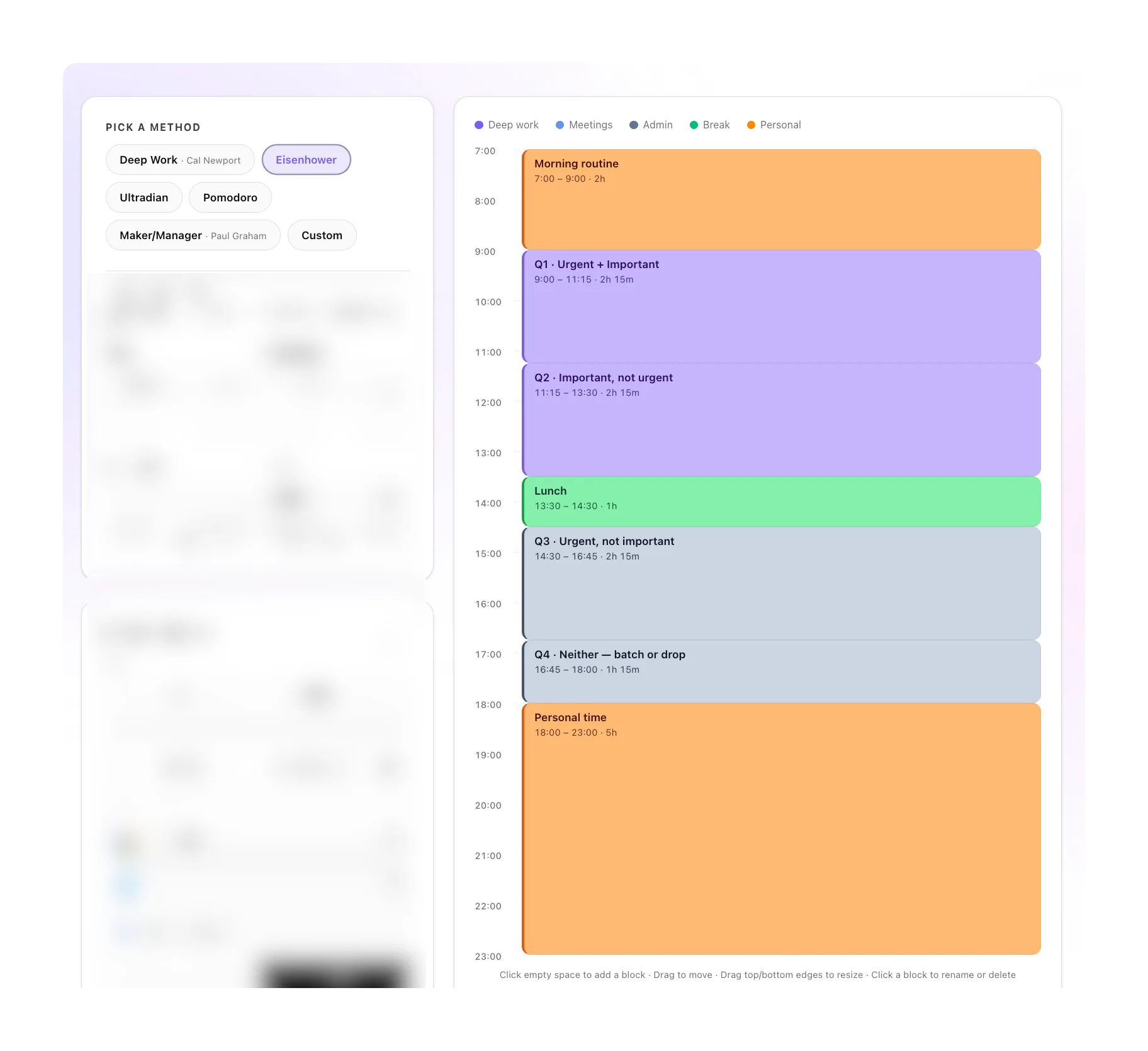
Sort tasks into 4 quadrants (urgent/important, not urgent/important, urgent/not important, not urgent/not important) and block time accordingly. The morning belongs to important-not-urgent work; reactive tasks get pushed to a single afternoon window.
Best for: chaotic days where everything feels urgent and you need a framework to say no.
You can load the Eisenhower preset directly to see what the structure looks like.
3. Pomodoro Stacking
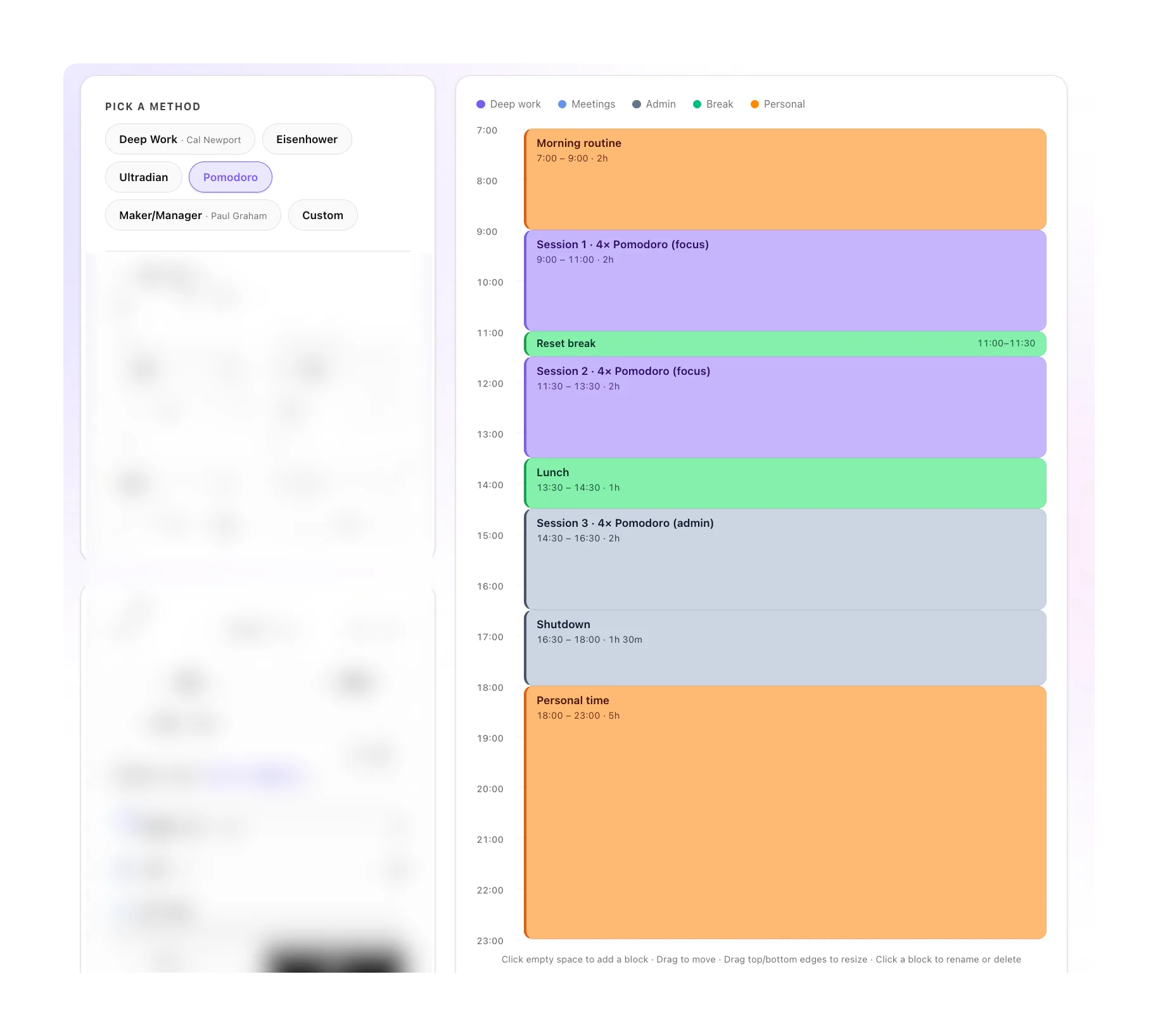
Classic Pomodoro (25 work / 5 break, repeat) is really a micro-version of time blocking. Pomodoro stacking wraps multiple Pomodoros inside a larger themed block — e.g. a 2-hour "writing block" containing four 25/5 cycles.
Best for: tasks you're avoiding. The 25-minute commitment is small enough to start.
4. Ultradian Rhythm
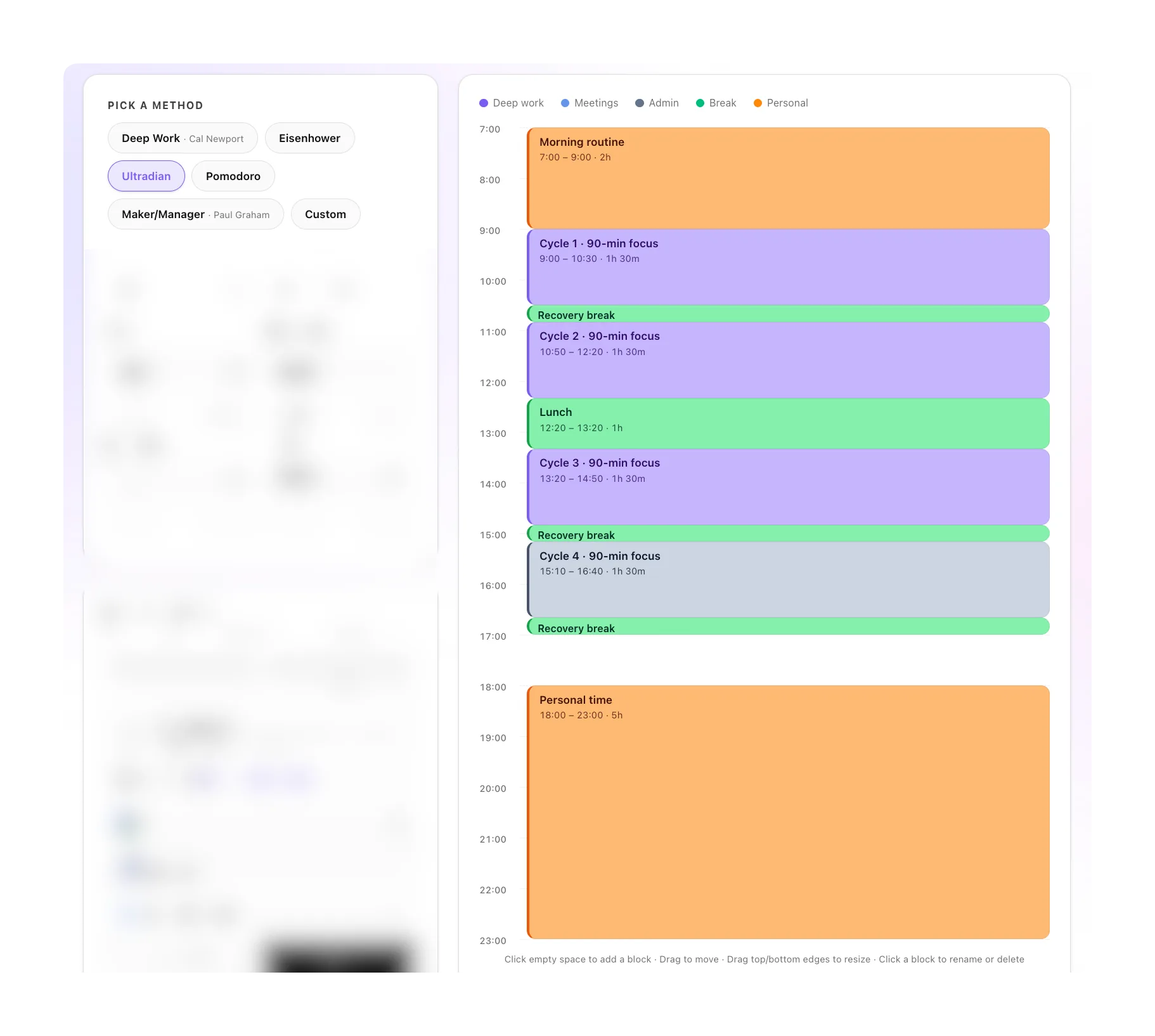
Based on Nathan Kleitman's research into the body's natural 90-minute focus/recovery cycles. 90 minutes work, 20 minutes recovery, repeat. Matches the biological rhythm of attention and prevents the slow cognitive decay that happens when you push past it.
Best for: anyone doing sustained creative or technical work over a full day. This is my personal default.
5. Maker / Manager (Paul Graham)
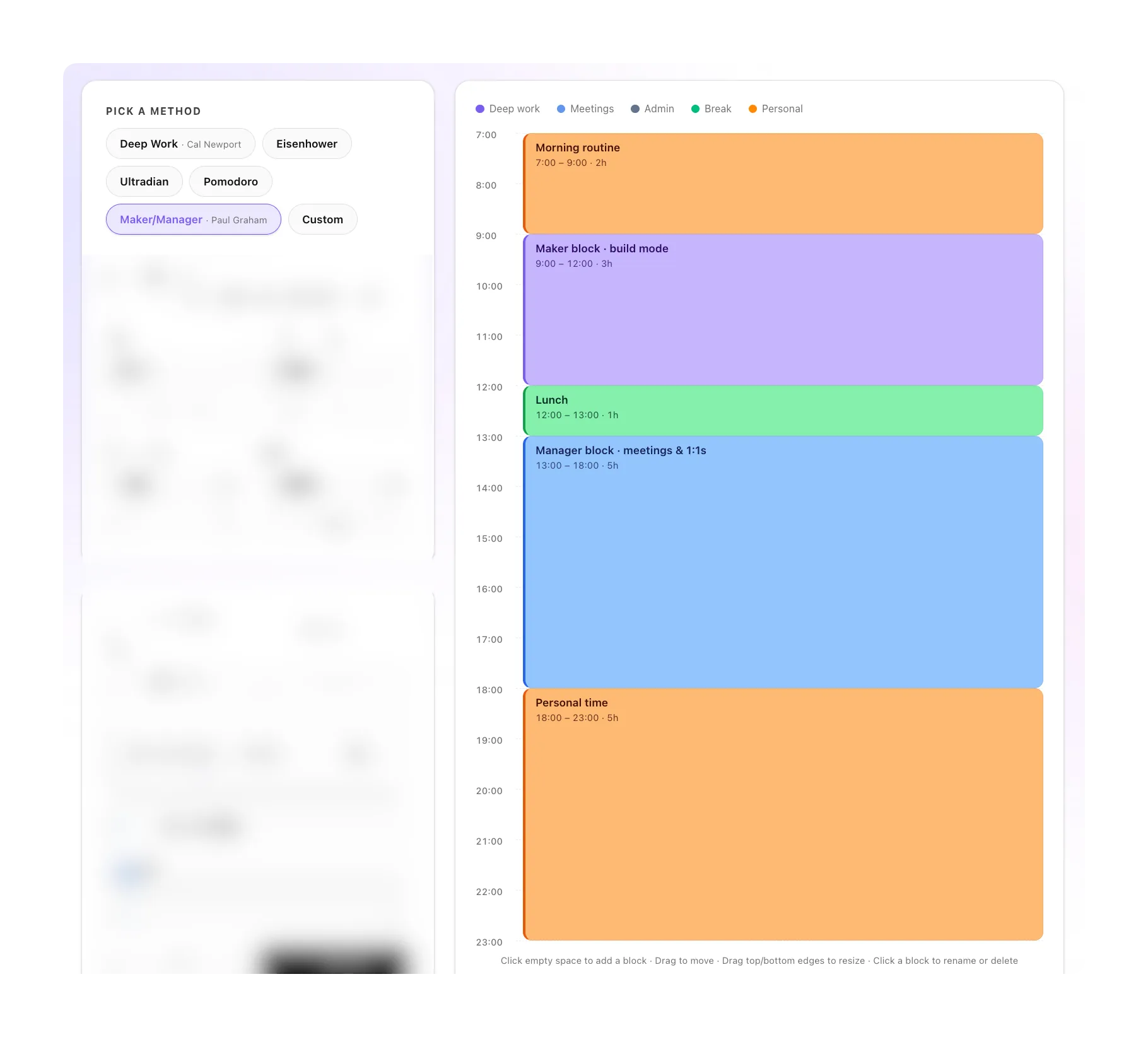
In his 2009 essay, Paul Graham split work into the "manager's schedule" (cut into 1-hour slots for meetings) and the "maker's schedule" (half-day blocks for building). The method: pick one mode per day and defend it. Monday/Wednesday = maker. Tuesday/Thursday = manager.
Best for: founders, engineers, anyone whose week contains both meeting-heavy and building-heavy work.
Most people never find "the right method" because they keep switching every week. Pick one. Commit for 2 weeks. Only then decide whether to try another. The method matters less than the consistency.
How I Actually Do It (3 Steps)
Enough theory. Here's the playbook I run.
Step 1: Shape your day
Before placing any blocks, decide the container.
- What time do I wake?
- What time do I stop working?
- When is my natural energy peak — morning or afternoon?
Most people's deep work capacity is highest in the first 3 hours after waking. Protect those hours first. Everything else lives inside the boundaries you set.
Step 2: Place the non-negotiables
Look at your calendar. Which meetings are actually fixed? Block those first.
Then place ONE deep work block in your peak energy window. Just one. A single 90-minute deep work block, executed well, will produce more meaningful output than 6 hours of distracted "work."
Do not over-plan the rest. Leave at least 25% of your day unblocked -> reality will eat into it whether you planned for it or not, and unblocked buffer is less painful than watching a perfect plan disintegrate by 10:30am.
Step 3: Put it in your calendar (not a PDF)
This is where most systems break.
- A beautiful template on paper does nothing when your 10am moves.
- A spreadsheet doesn't send notifications.
- A Notion page doesn't sync to your phone.
The right home for a time block is your real calendar — Google, Outlook, Apple — sitting next to your actual meetings, moving with them.
This is exactly why we built a free time blocking generator that skips the PDF entirely. Pick a method. Shape your day. Drag the blocks. Export to your calendar as a .ics file. The whole thing takes 90 seconds, and the output lives in the one place you actually check every day.
Why Most Templates Fail (and What to Do About It)
The average time blocking template has a half-life of about 3 days. You fill it Sunday, follow it Monday, tweak it Tuesday, ignore it Wednesday, forget it exists by Thursday.
The problem is not discipline. It's that the template is frozen in a format that cannot absorb reality.
Real calendars move. Meetings get rescheduled. Kids get sick. A production bug eats your afternoon. A static PDF has no way to respond. Your carefully planned 2pm deep work block doesn't notice that your 1pm ran long -> it just becomes a lie printed on paper.
The fix is structural, not motivational. Stop treating time blocks as a separate artifact from your calendar. Treat them as calendar events. When reality moves, the blocks move. When you reschedule a meeting, your focus block gets reshaped automatically. When your day runs long, the evening block slides forward.
And once you accept that the calendar is the right home for time blocks, the next obvious question is the one I kept asking myself -> why am I doing this manually every morning?
That's the real direction this is going. Not "a better template." A system that builds your day for you, every morning, based on what's actually on your calendar and in your inbox. We're building it. You can join the waitlist here.
In the meantime: build your day in our free generator →
FAQ
What is time blocking?
Time blocking is the practice of assigning every block of your workday to a specific task or category, rather than working from a to-do list. Cal Newport popularized the modern version in Deep Work.
What's the 5 time blocking method?
There isn't a canonical "5 method," but the 5 most-used systems are: Deep Work (Cal Newport), Eisenhower Matrix, Ultradian Rhythm, Pomodoro Stacking, and Maker/Manager Schedule (Paul Graham). All 5 are built into our free template generator.
How do I create a time block schedule?
Pick a method (or start blank), set your wake/sleep/work hours, drag the blocks to fit your day, then export to your calendar. The whole process takes about 90 seconds.
Is time blocking effective for ADHD?
Many people with ADHD find time blocking helpful because it removes the constant decision of "what next." That said, the rigid version often backfires -> start with broader category blocks ("focus work") rather than minute-by-minute task scheduling.
How long should a time block be?
Most research points to 60-90 minutes for deep work (matches the body's ultradian cycle), with 10-20 minute recovery breaks. Avoid blocks shorter than 25 minutes for focus work — there's a context-switching tax.