Key Takeaways
- 4 ingredients in a real pre-meeting brief: who they are, what's open, what you owe, and time to actually read it.
- Otter, Fathom, Granola, Read AI -> all great at capture. None of them prep you for the next call.
- ChatGPT can't fix this either. It doesn't know your inbox, your CRM, or your prior meetings.
- Omnia is built around the before of the meeting. Pulls context from email, transcripts and tasks. Auto-blocks time to read it. Waitlist-only for now.
15 meetings a week. 5 minutes of scramble each.
That's an hour a week, gone before anyone joins the call. And that's only the meetings I remember to prep for.
Most "AI meeting" tools don't fix this. They record what happened. They transcribe what was said. They send you a recap two days later, when it's too late to use.
The leverage is in the before. Walking in already briefed. Knowing who, knowing what you owe them, knowing what "good" looks like for the next 30 minutes.
Here's how I think about pre-meeting prep in 2026:
-> The 4 things a real brief actually needs -> Why note-takers like Otter, Fathom, Granola and Read AI miss the point -> The workflow I run before every call -> The tools that can (and can't) actually handle it
No filler. Just the playbook.
What "AI Meeting Prep" Actually Means in 2026
AI meeting prep is using AI to assemble the context, history and intent for an upcoming meeting before it starts.
Not to summarize it afterwards.
A real pre-meeting brief tells you who's on the call. What you last discussed. What's still open. What the next best move is.
It's the inverse of a note-taker. Notes are a record of the past. A brief is a forecast of the next 30 minutes.
The reason most professionals don't have this today isn't lack of want. It's that context is scattered across 5 tools (calendar, email, CRM, last transcript, the doc someone dropped in Slack). Assembling it by hand costs more time than the meeting itself.
The 4 Things a Real Pre-Meeting Brief Requires
These are the criteria the rest of this guide maps against. Miss one and you're not prepping. You're reorganizing the past.
-
Attendee context, not attendee names. Who is this person? When did you last talk? What did you promise them? A name and a job title is a business card, not a brief. The last 2-3 touchpoints have to surface automatically.
-
Open threads from prior conversations. If this is meeting #4 in a sequence, you need what was decided in #1, #2 and #3. And what got dropped. Most note-takers archive each meeting in isolation. A real brief stitches them together.
-
Action items you owe (and they owe you). The fastest way to lose credibility on a call is to show up without the thing you said you'd send. The brief needs an explicit "you committed to X by today" line. Pulled from prior transcripts and email. Not buried in a Notion doc you forgot to open.
-
Time to actually read it. A perfect brief generated 30 seconds before the call is useless. The brief has to land on your calendar with a real, defended block of prep time. 10 minutes is enough. Auto-scheduled before the meeting starts. Otherwise you're scanning it during the small talk.
Why Generic Approaches Fall Short
The default "prep" most people do today: -> open the calendar invite -> click the LinkedIn -> ctrl-F the last email thread -> maybe paste a few things into ChatGPT
Then the next meeting starts and the prep stops mid-sentence.
This breaks for three reasons.
ChatGPT only knows what you paste in. It doesn't have your inbox. It doesn't have your CRM. It doesn't have your prior transcripts or your task list. The quality of the brief is capped by how much you can manually copy in, which defeats the point of using AI.
Note-takers solve the after, not the before. Otter, Fathom, Granola and Read AI are great at capturing meetings. None of them is built to walk you into the next one with a synthesized brief from the last three. One founder put it on r/microsaas: "by the afternoon, your brain is fried trying to remember: Who's this client again? What did I promise last time? What's actually important for this call?" (source)
Manual prep doesn't survive a busy week. A salesperson on r/MarketingAutomation called it the "15-minute scramble where you Google the company, skim their website, check LinkedIn, copy notes into your CRM, try to come up with a few smart talking points". Then admitted the moment a day gets hectic, the scramble gets skipped. (source)
Same pattern in every thread. People know prep is the highest-leverage 10 minutes of their day. They just can't do it by hand at 15+ meetings a week.
A Real Workflow, Step by Step
Here's the 4-step workflow that survives a busy week. Assume any step that takes more than 30 seconds of manual effort gets skipped on a Tuesday afternoon. So each step is designed to either run automatically or take less time than refilling a coffee.
Step 1 -> Tag the meetings that actually need prep
Not every meeting needs a brief. A standing 1:1 with your cofounder doesn't. A first call with a prospect does.
The mistake most people make: try to prep every block, burn out by Wednesday, prep none of them.
Pick a rule and stick to it. A reasonable default for founders and consultants:
-> any external meeting with someone you've talked to fewer than 5 times -> any meeting longer than 45 minutes -> any meeting where money or a decision is on the line
Everything else gets a 60-second skim.
One note. If you "need a brief" for an internal weekly sync, the meeting probably shouldn't exist. Use the tagging exercise as a forcing function to kill or shorten the meetings that don't earn it.
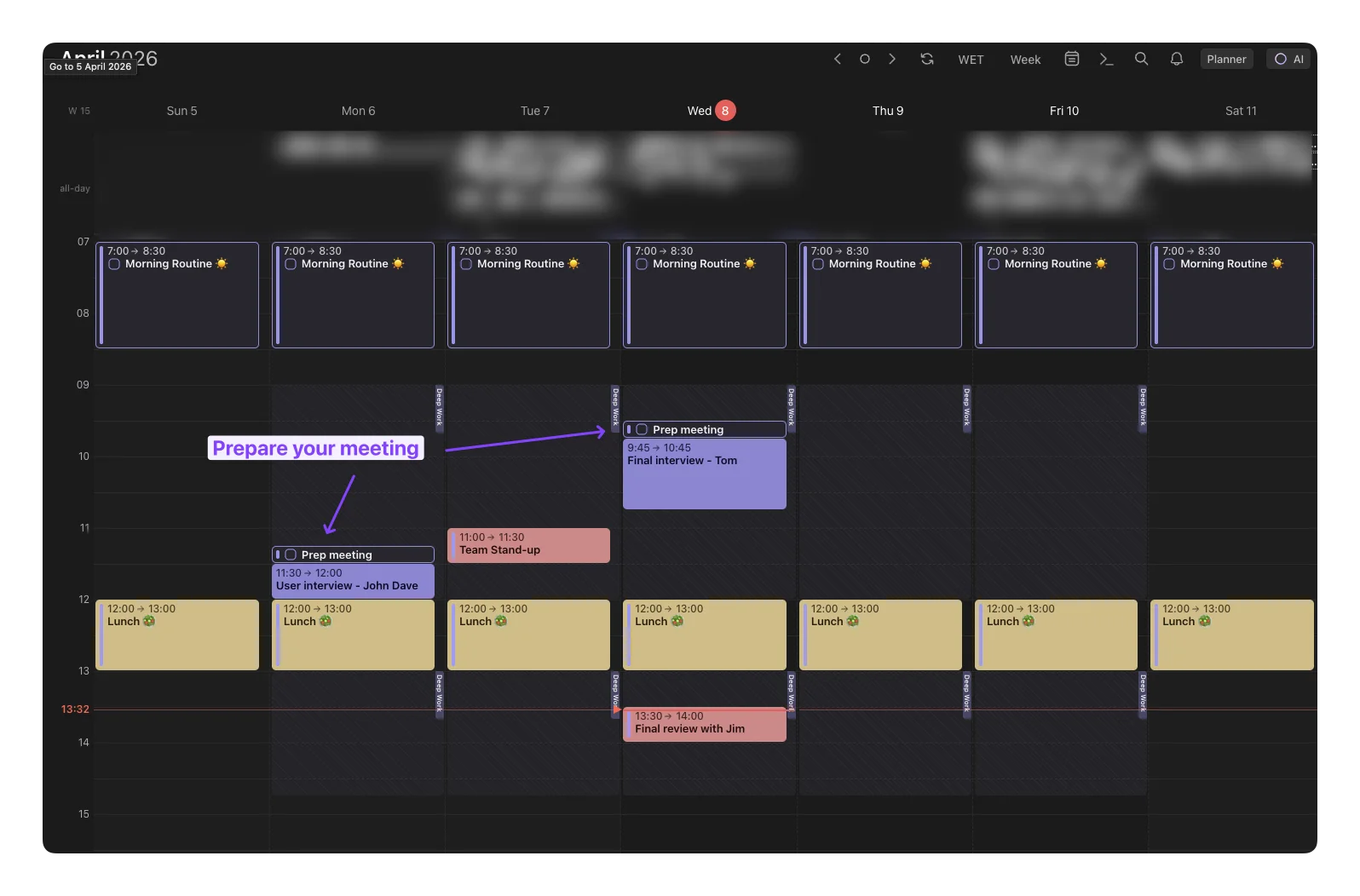
Step 2 -> Auto-pull the context you'd otherwise hunt for
For each prep-tagged meeting, the brief needs:
-> the last email thread with the attendee -> the most recent prior meeting transcript or summary -> any tasks where they're the assignee or the source -> any docs they sent in the last 30 days
By hand, this is 5-10 minutes per meeting. It's the single most-skipped step in real life.
The fix is automation. Either glue it together with a workflow tool (one builder on r/n8n shared their stack: "Client books → system pulls booking details and scrapes public/company data", full breakdown at r/n8n). Or use an assistant that already has your email, calendar and tasks under one roof.
A useful brief is structured, not a wall of text. Three sections (Who they are, Last time you talked, What's open) beat a 2,000-word context dump every time. You're reading it in 90 seconds, not 9 minutes.
Step 3 -> Schedule the prep block, before it gets eaten
This is the step that turns a brief into an actual change in behavior.
The brief has to come with calendar real estate. 10 minutes. Defended. Before the meeting it's prepping you for.
Not after. Not "whenever you have a sec". Before. If it's not on the calendar, it doesn't happen.
Small gotcha nobody mentions. Schedule the prep block at least 15 minutes before the meeting, not immediately before. If your prep ends at 2:00pm and your call starts at 2:00pm, you'll start the call still mid-thought. A 15-minute buffer is the difference between "I'm ready" and "give me one second I'm pulling something up".
Step 4 -> Capture the next-meeting context during this meeting
Step 4 closes the loop. It makes Step 2 cheap forever.
During the current meeting, your job is to make sure the next meeting's prep is half-done already. Capture the action items. Capture the decisions. Capture the open questions. And land them in the same system as the brief.
This is where note-takers like Granola, Fathom, Otter and Read AI earn their keep. They're not great at the before, but they're the difference between a usable Step 4 and a meeting that vanishes. Just make sure the output goes somewhere your prep workflow can actually read in Step 2. Not a transcript graveyard.
Tools That Handle This Today
Most tools in this category are better at meeting capture than meeting prep. Here's where the popular options actually land against the 4 criteria.
Otter AI. Strong real-time transcription, speaker labels, post-meeting summaries. Its "Meeting GenAI" feature tries to pull context from past meetings, but the brief is generated from Otter's own transcripts. Not your inbox. Not your task list. Solves Step 4 well, partially solves Step 2. For deeper context see the Otter AI review and its pricing breakdown.
Fathom. Free, polished, popular with sales reps. Great at recording, summarizing, pushing notes into a CRM. Like Otter, the strength is the after. Pre-meeting context is limited to prior Fathom-recorded calls. Doesn't read your email or your tasks. The Fathom vs Granola breakdown goes deeper.
Granola. A favorite among consultants and PMs. Hybrid: listens to the meeting and cleans up your rough notes afterwards. Lovely Step 4 tool. No Step 1, no Step 3. Full take in our Granola review.
Read AI. Pitches itself as a "meeting copilot" with pre-meeting briefs as a feature. Closer to the topic than the others, but the brief is mostly a meeting agenda + attendee LinkedIn snapshot. Not a pulled-together view of your last conversations and open commitments. The Read AI review covers where it actually lands.
The honest pattern: every tool above is built around the meeting itself. None owns your calendar, email and tasks the way an actual executive assistant would. Which is why none of them can do all 4 steps end-to-end.
How Omnia Approaches Pre-Meeting Prep
Omnia is an AI executive assistant. Not a note-taker.
It's built around the part of the meeting that happens before the meeting starts. The reason it can do this is structural. It sits on top of your calendar, your email and your tasks. Plus it can capture the meeting silently. So when it generates a brief, it's pulling from all of them at once. Not just from a transcript archive.
Three things map directly to the criteria above:
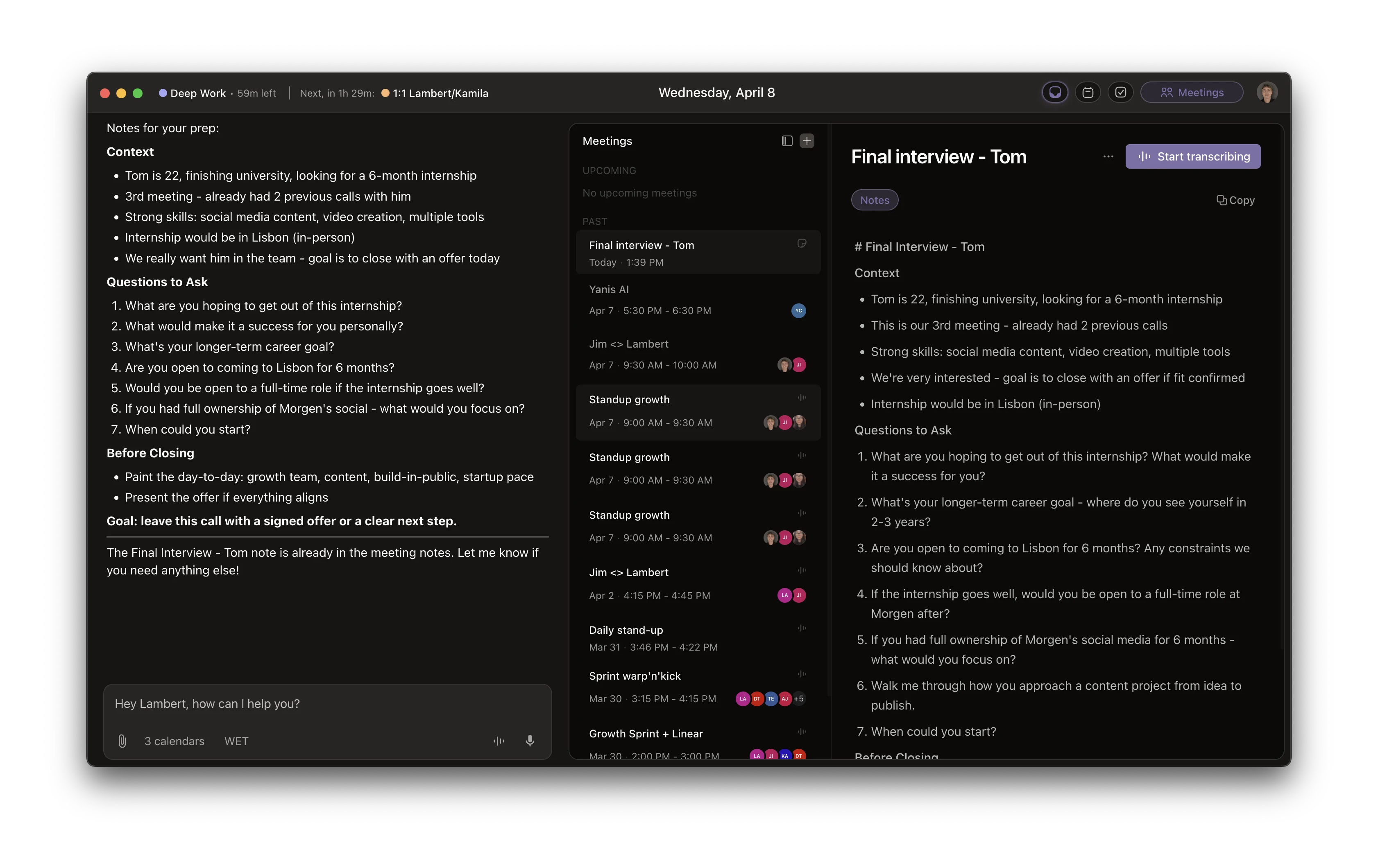
- Pre-meeting briefs. For important upcoming meetings, Omnia assembles a brief combining the last email thread with the attendee, prior meeting summaries, and any tasks you owe them. That's criterion #1 and #3 in one place. (See the Omnia meetings overview for the underlying capability.)
- Auto-blocked prep time. When a meeting is flagged as needing prep, Omnia auto-schedules a prep block before it. That's criterion #4: the brief lands with real, defended time to read it.
- Botless meeting capture + action item triage. Omnia joins Zoom, Google Meet, Teams, Webex and Slack Huddles silently (no visible bot), pulls out action items, routes them into a triage workspace where you accept, edit or reject each one before they hit your tasks. That feeds Step 4 directly into Step 2 of the next meeting. See the meeting action items workflow for the full loop.
Honest limitation: Omnia is waitlist-only and newer than the established note-takers. If you need a battle-tested free recorder for tomorrow's call, Fathom or Granola get you there faster. Omnia's bet is on the workflow, not the recording. It's built for people doing 15+ meetings a week who feel the prep gap acutely enough to wait for early access.
Omnia handles your calendar, email, and tasks before you even start your day
Free forever. No credit card required.
When This Approach Is Overkill
Be honest with yourself. Not everyone needs structured AI meeting prep.
3-5 meetings a week, mostly internal, mostly people you already know well? You don't need this. A 60-second glance at the calendar invite is enough. Any system on top of that creates more friction than it removes.
Mostly recurring 1:1s with the same 5 people? Same answer. The context you need is in your head, not in a brief.
The break-even, based on every interview and Reddit thread we've read on this, is roughly 10-15 external meetings per week with a rotating cast. Below that, manual prep works. Above that, it silently degrades. And the people on the other side of the call start to notice.
FAQs
What's the difference between AI meeting prep and AI meeting notes?
Notes are a record of what happened after a meeting ends. Prep is the brief you read before it starts: attendee history, open threads, action items, what good looks like. Most popular tools (Otter, Fathom, Granola) are notes tools. Very few are real prep tools.
Can ChatGPT do AI meeting prep?
Only as well as you can paste context into it. It doesn't have your inbox, your CRM, your prior transcripts or your tasks. The brief is capped by what you copy in by hand. Fine for one-off important calls. Doesn't scale to 15+ meetings a week.
How long should a pre-meeting brief be?
Short. Aim for 60-90 seconds of reading. Who they are, when you last spoke, what's open, what you owe them, one line on the desired outcome. Half a page or less. Longer than that and you'll skim it and miss the important bit.
When should the AI generate the brief?
Far enough in advance to schedule a prep block before the meeting. Morning of, or the night before for early calls. A brief generated 30 seconds before the call is a transcript of your panic.
Do I need to prep for every meeting?
No. Trying to is the fastest way to abandon the workflow. Prep external meetings with people you've spoken to fewer than 5 times, meetings longer than 45 minutes, and anything with real money or a decision on the line. Everything else gets a 60-second glance.
Will an AI meeting prep tool work without access to my email?
Probably not. Most of the value of a brief is "what did we last say to each other". That history lives in your inbox. A tool with calendar-only access can tell you who's on the call. Not where you left things. The second part is the one that matters. If you want to compare what an inbox-aware tool actually looks like, the Otter AI alternatives roundup is a good starting point.
How is this different from a CRM like HubSpot or Salesforce?
A CRM is a system of record. It stores what happened. An AI prep tool is a system of action. It surfaces what to do next, in the right format, at the right moment. Complements, not substitutes. Best workflows have both: CRM for long-term history, AI prep for the 10 minutes before a call. If you're scoping the planning side of the same workflow, the Motion app review and Motion vs Notion cover where AI planners fit into this stack.