Key Takeaways
- Pro is $15/user/month annual ($19.75 monthly). Free tier caps at 5 meetings/month. Enterprise is $22.50 annual ($29.75 monthly). Verified April 2026 on read.ai/pricing.
- The real moat is cross-surface coverage. Meetings + email + Slack in one searchable workspace. Otter, Fathom and Granola don't do this.
- Speaker Coach is the most polarizing feature in the category. Self-coaching mirror = useful. Manager dashboard = HR landmine.
- A visible "Read AI Notetaker" joins every call. If you take client meetings, that's the single biggest reason people leave.
- Omnia is the botless, action-routing alternative. Captures meetings silently and pushes action items into your tasks, calendar and inbox automatically.
$15/user/month annual ($19.75 monthly). A visible bot in every call. One "vibe score" that can get a teammate fired.
Read AI is the rare meeting tool that escaped the meeting. It went after the inbox, Slack, calendar analytics, the whole workday. That's the interesting bet. It's also where the product gets messy.
This review is based on the team's research, public Reddit and G2 threads, and the live pricing page (verified April 2026). Three things stand out fast:
-> the speaker analytics are genuinely unique -> the visible bot is genuinely a problem -> the email and Slack copilots are the only reason to pay double Otter
Pricing, Speaker Coach, the bot problem, what it gets right, and when a botless tool makes more sense.
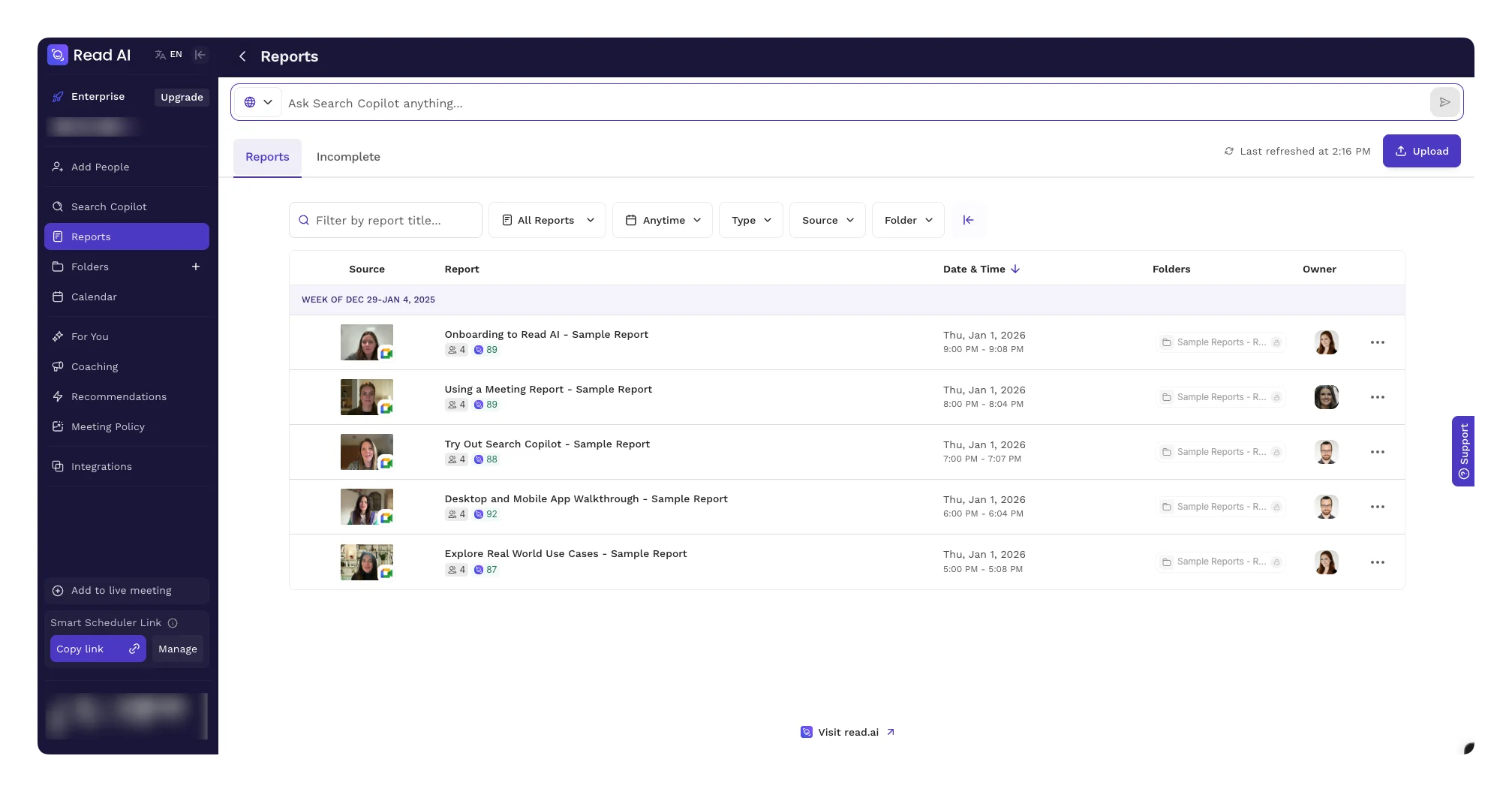
Read AI at a Glance
| Read AI | |
|---|---|
| Best for | Managers and ICs who want meetings, email, and Slack summarized in one workspace |
| Standout feature | Speaker Coach analytics (sentiment, talk time, engagement, "vibe" score) |
| Price | Free (5 meetings/mo) -> Pro $15/user/mo annual ($19.75 monthly) -> Enterprise $22.50/user/mo annual ($29.75 monthly) |
| Bot in meeting | Yes. Visible participant called "Read AI Notetaker" |
| Platforms | Web, macOS, Windows, iOS, Android, Chrome, Zoom, Meet, Teams, Slack, Gmail, Outlook |
| Pros | Cross-surface coverage, strong analytics, 30+ languages, generous free tier |
| Cons | Visible bot, polarizing Speaker Coach, hit-or-miss email summaries, auto-join over-eager |
What Is Read AI?
Read AI is an AI copilot for meetings, email and chat. Started in 2021 as a meeting analytics tool (sentiment, engagement, talk time). Now a full workspace that summarizes Zoom/Meet/Teams calls, Gmail and Outlook threads, and Slack/Teams messages. All searchable from one place.
Otter and Fathom are meeting-only tools with bolt-ons. Read's bet is different: the meeting is one channel. The same conversation continues in email, in Slack, in another meeting next week. Read stitches them together. Ask "what did we decide about the Q3 launch" and you get the answer without remembering whether it happened on Zoom or in #product.
The company raised a $50M Series B led by Goldman Sachs Growth in 2024. Reports 1M+ users. Fast enough growth to push them out of the "meeting notes" bucket and into "AI copilot". For better and worse.
Who Read AI Is Best For
Managers running 20+ meetings a week. Speaker Coach is useful for spotting your own patterns. When you dominate. When you ask too few questions. When you trail off in 1:1s. As a self-coaching mirror, it's the most original feature in the category.
Teams that live in Slack and email as much as in meetings. If half your decisions happen async, having one AI summarize all three surfaces is a real unlock. Otter and Fathom can't do this.
Multi-language teams. 30+ languages reliably. Otter Pro only supports 3.
Sales reps logging calls to CRM. Native HubSpot and Salesforce sync is solid. If you're stacking this with a planner, the Motion app review covers the planning side.
Who should look elsewhere:
- Anyone with client-facing calls. External attendees see the "Read AI Notetaker" in the participant list. Use a botless tool.
- Budget-conscious individuals. Otter is less than half the price if you only need transcripts. See the Otter AI review and Otter AI pricing.
- Anyone whose manager would weaponize the Speaker Coach. Not joking. See the controversy section.
Omnia: The Botless Alternative
The visible bot is a hard ceiling for anyone running client meetings. That's where Omnia, Morgen's AI executive assistant, fits.
Where Read brings a bot, Omnia captures the meeting silently. Then chains the action items into your tasks, your calendar and your inbox automatically. The part Read still leaves to you.
- Botless meeting capture. No participant joins your call. Your client doesn't ask "who's that?"
- Cross-tool intelligence chain. Action item -> task. Task -> calendar block. Stalled commitment -> email follow-up draft. Read summarizes. Omnia routes.
- One assistant across email, meetings and planning. Same surface area as Read for Email and Read for Messages, but with real scheduling on top. Nobody else does the planning step.
Omnia is in early access (join the waitlist). Better fit if you want the AI to do the next step, not just tell you what it was. For a deeper look at the workflow side, our AI meeting prep guide walks through how to turn meeting history into a real briefing. The Fathom vs Granola comparison covers the other two main alternatives.
| Tool | Bot | Best for | Starts at |
|---|---|---|---|
| Omnia | None (silent) | Want the AI to act on action items, not just list them | Free trial (Personal $29/mo) |
| Read AI | Visible | Cross-surface coverage and self-coaching analytics | Free (Pro $15/user/mo annual) |
Omnia turns meeting notes into action — no copy-paste, no context switching
Free forever. No credit card required.
Read AI Pricing (Verified April 2026)
Read AI restructured pricing in late 2025. The homepage doesn't make this obvious. Here's what's actually current as of April 2026.
| Plan | Annual (per user/mo) | Monthly | What you get |
|---|---|---|---|
| Free | $0 | $0 | 5 meetings/month, basic summaries, transcripts, Speaker Coach (limited) |
| Pro | $15 | $19.75 | Unlimited meetings, full transcripts, premium integrations (Notion, Salesforce, HubSpot, Jira), Read for Email, Read for Messages, 100 file uploads/mo |
| Enterprise | $22.50 | $29.75 | Everything in Pro + audio & video playback, video highlights, 200 file uploads/mo, premium support |
| Enterprise+ | $29.75 | $39.75 | Everything in Enterprise + HIPAA, SSO/SAML, domain capture, custom retention, 300 file uploads/mo, 10-license minimum |
Source: read.ai/pricing, verified 2026-04-07.
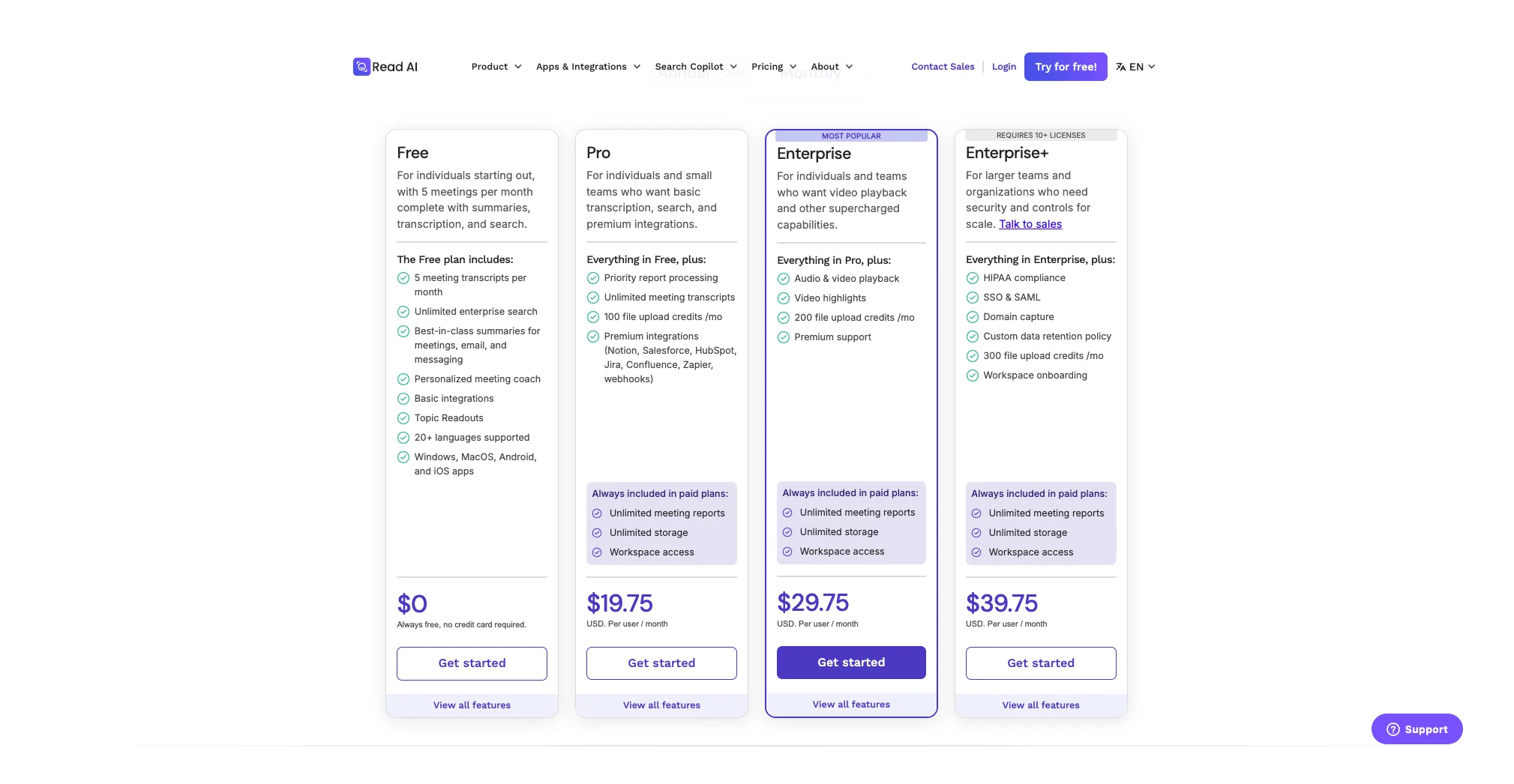
A few honest notes on Read AI pricing
- The free tier is a trial in disguise. 5 meetings caps out by Wednesday for most managers.
- Pro is where most individuals end up. $15/user/mo annual ($19.75 monthly). Almost double Otter Pro at $8.33/mo annual. You're paying for the email and Slack copilots, not the meeting summaries.
- Enterprise unlocks the manager dashboard. Where Speaker Coach gets organizationally interesting. And risky.
- No team Pro tier. A 5-person team pays 5 × Pro or jumps to Enterprise. The gap is a deliberate funnel.
Read AI Key Features
Meeting Copilot
Read AI auto-joins Zoom, Google Meet, Microsoft Teams and Webex via calendar sync. Once in, it transcribes live, generates a topic-based summary, extracts action items, ships everything to your workspace and email within a minute of the call ending.
Summaries are good. Not "industry-leading". Otter, Fathom, Granola and Bluedot all hit the same bar in 2026. Topics cluster correctly. Action items usually go to the right person. Chapters make long calls navigable.
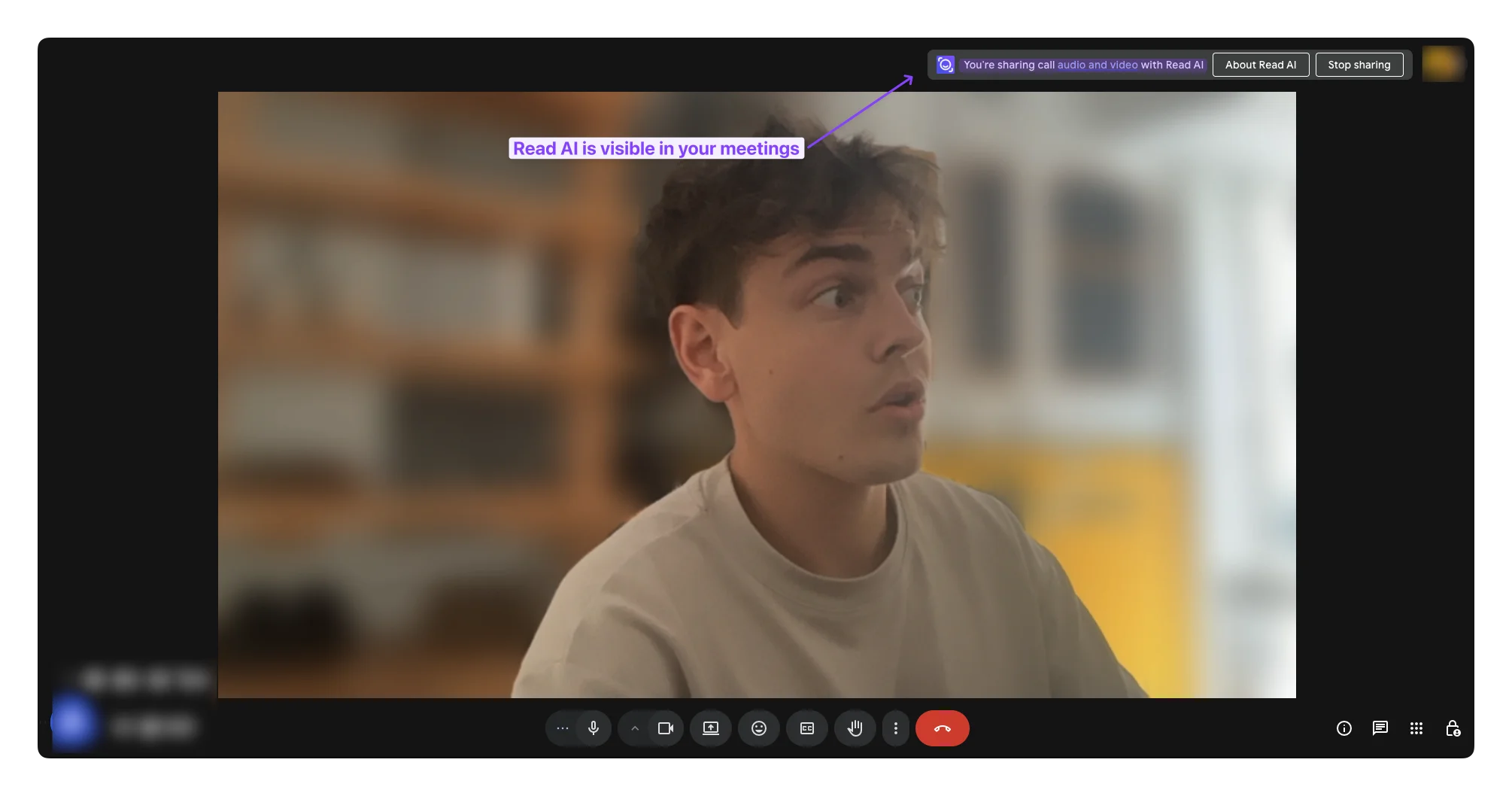
The catch: the bot is visible. It joins as "Read AI Notetaker" and everyone sees it. Internal meetings, fine. External client calls, sales calls, board meetings, or therapy sessions accidentally synced from a shared calendar? Ranges from awkward to actively damaging.
"I had a Read AI bot show up to a 1:1 with my therapist. I never installed it, my boss had it on a shared calendar invite. I'm still not over it." Source: r/productivity
Not one isolated post. Search "Read AI creepy" or "Read AI bot uninstall" and the same story repeats. Opt-out UX is buried. Calendar-based auto-join is on by default. Read inherits invites from anyone who shares a calendar with you.
Speaker Coach (the controversial one)
Read AI's signature feature. The most divisive thing in the category.
After every meeting, Read scores you (and everyone else) on:
- Talk time. What % of the meeting you spoke
- Question rate. How often you asked questions
- Sentiment. Positive, neutral, negative
- Engagement. Derived from voice tone, response timing, video signals
- "Vibe". Read's composite score
As a self-coaching mirror, this is useful. The kind of pattern data Otter and Fathom can't give you.
As a manager dashboard? It's a landmine. Read for Enterprise surfaces team-level talk time and engagement charts, and the obvious next step is "rank your reports by engagement score". That's the fastest path to a wrongful termination suit ever shipped in a SaaS product.
"The summaries are great. The 'engagement score' it gave my teammate is the kind of thing that gets you fired by HR if you ever act on it." Paraphrased from multiple r/sales threads
IC? Turn Speaker Coach on. Manager? Turn the team-level view off and never bring it up in a 1:1. Impressive engineering and an HR nightmare in the same package.
Read for Email (Gmail + Outlook)
The underrated half of Read AI. Gmail sidebar (and Outlook add-in) summarizes long threads, surfaces priority, drafts replies. The threading model actually understands which messages matter in a 30-reply chain and which are noise.
Less polished than Shortwave or Superhuman. Transformative compared to no AI in your inbox. If you're paying for Pro, this is half of what you're paying for. Most reviews ignore it.
Read for Messages (Slack + Teams)
Channel digests, thread summaries, "what did I miss" rollups when you come back from PTO. Solid. Not magic. Slack's own AI is catching up fast. The most likely feature to be commoditized in 2026.
Search Copilot (Ask Read)
Cross-surface semantic search. Ask "what did we decide about pricing" and Read pulls from meetings, email and chat. The killer feature you don't appreciate until month two. Makes the rest of the product feel like an investment instead of a subscription.
Analytics & Reports
Personal dashboard: meeting load, talk time trends, sentiment over time. Useful for a quarterly self-review. Manager dashboard (Enterprise): same data aggregated for the team. Tread carefully.
Read AI Pros & Cons
Pros
- Cross-surface coverage (meetings + email + chat) is genuinely unique
- Speaker Coach is the most original analytics feature in the category
- 30+ languages with reliable accuracy
- Generous free tier for individual evaluation
- Auto-join across Zoom, Meet, Teams, Webex is rock-solid
- Strong CRM integrations (HubSpot, Salesforce native)
- Search across meetings + email + chat is the real long-term value
Cons
- Visible bot is a hard blocker for client-facing calls
- Speaker Coach team analytics are an HR liability waiting to happen
- Auto-join is over-eager and the opt-out UX is buried
- Pro pricing is double Otter for users who only need transcripts
- Email summaries are less polished than dedicated AI inboxes
- No team Pro tier, gap forces small teams onto Enterprise
- Privacy and data retention questions in regulated industries
Read AI vs Otter vs Granola vs Fathom
| Read AI | Otter.ai | Granola | Fathom | |
|---|---|---|---|---|
| Bot in meeting | Visible | Visible | Botless | Visible |
| Best feature | Cross-surface search | Cheap, accurate transcripts | Botless capture + clean notes | Free unlimited recording |
| Free tier | 5 meetings/mo | 300 mins/mo, 30-min cap | 25 meetings/mo | Unlimited (with limits) |
| Pro price (annual) | $15/user/mo | $8.33/user/mo | $14/user/mo | $16/user/mo |
| Email summaries | Yes | No | No | No |
| Slack/Teams summaries | Yes | No | No | No |
| Speaker analytics | Signature feature | Limited | None | Basic |
| Languages | 30+ | 3 | 1 | 1 |
| CRM sync | HubSpot, Salesforce | HubSpot, Salesforce | Notion, Slack | HubSpot, Salesforce, Close |
| Best for | Managers, multi-surface teams | Budget individuals | Privacy-first, client calls | Sales teams on a budget |
Quick decision rule:
- Need clean transcripts cheap? Otter. See Otter AI alternatives for the broader landscape.
- Need botless capture for client calls? Granola (or Omnia for the action-item chain).
- Need free unlimited recording for a sales team? Fathom. Compared to Granola in the Fathom vs Granola review.
- Need meetings + email + Slack in one searchable workspace? Read AI.
For the Otter side of this matrix, see Fathom vs Otter. For the AI assistant landscape beyond meetings, Cluely alternatives is a solid sidebar read.
Is Read AI Worth It?
Yes, if you're a manager or knowledge worker doing 15+ meetings a week with a serious volume of email and Slack. Pro at $15/user/mo annual is worth it for cross-surface search alone. Speaker Coach is a useful self-coaching mirror as long as you don't share it with your manager.
No, if any of these are true:
- Your meetings are mostly client-facing and a visible bot is awkward -> Granola, Bluedot or Omnia.
- You only need transcripts -> Otter is less than half the price.
- You're a small team that can't justify Enterprise but needs more than one Pro seat -> the pricing gap will frustrate you.
- You work in a regulated industry where sentiment analysis on coworkers is a compliance problem -> skip outright.
The honest verdict. Read AI is the most ambitious tool in this category and the most polarizing. The bot problem and the Speaker Coach controversy are real. They're the price of doing something nobody else is doing. Want the boring, safe choice? Otter or Fathom. Want the tool trying to become your second brain across every channel? Read.
Omnia triages your inbox so you only see what matters
Free forever. No credit card required.
FAQ
Is Read AI free?
Yes. Free tier gives you 5 meetings/month, basic summaries, transcripts and limited Speaker Coach. Most active users hit the cap by mid-week. Treat it as an extended trial, not a long-term plan.
How much does Read AI cost in 2026?
As of April 2026, Pro is $15/user/month annual ($19.75 monthly). Enterprise is $22.50/user/month annual ($29.75 monthly). Enterprise+ is $29.75/user/month annual ($39.75 monthly), 10-license minimum. Verified at read.ai/pricing.
Does Read AI join meetings as a bot?
Yes. It joins Zoom, Google Meet, Microsoft Teams and Webex as a visible "Read AI Notetaker" in the participant list. If you need silent capture, look at Granola, Bluedot or Omnia.
Is Read AI better than Otter?
Different tools. Otter is cheaper and produces cleaner standalone transcripts. Read AI is roughly double the price and adds email summaries, Slack/Teams digests, cross-surface search and Speaker Coach. Need transcripts only? Otter wins on price. Need one AI across meetings, email and chat? Read AI wins.
Is the Read AI Speaker Coach accurate?
Talk time and question rate are mechanically accurate. Sentiment and "engagement" scores are inferences based on voice tone, video signals and language patterns. Directionally useful for self-coaching. Not reliable enough to use as performance data.
Can Read AI join meetings without my permission?
The most common complaint. Read auto-joins meetings via calendar sync once you connect your account, including meetings shared by colleagues. Fix: Settings -> Meeting Capture -> Calendar Rules, blocklist by title or attendee. Configure this before connecting your work calendar.
What's the best Read AI alternative?
Depends on what you want. Otter for cheap transcripts. Granola for botless capture. Fathom for free unlimited recording. Omnia if you want the AI to act on action items, not just list them. Botless capture plus automatic task and calendar routing. Join the waitlist.